
Spine Project - Neonatal Milk Administration
Overview
At a very high level, a system can send milk feed data to a RESTful endpoint on the Spine for the purpose of storing the data in BadgerNet. The Spine will then send back a simple response indicating whether or not the request was successful.
The process is synchronous, therefore the system must wait for the Spine to respond after it is finished processing the request.
Authentication
Before sending a message to the Spine, the system (client) must obtain an Access Token from the Spine’s Identity Server. This requires a client ID, secret and scope, which will be described in more detail below.
Message format
Once a token is obtained, the milk feed can be sent to the Spine as a POST (create) or PUT (update) request message along with the token. The milk feed must be a JSON-formatted FHIR version 4 resource, which is detailed further on this page.
The milk feed is composed of a FHIR bundle with three resources each representing different parts of a feed:
BNetNN_MilkFeed resource
Contains all feed-related information. Stands for BadgerNet Neonatal Milk FeedPractitioner resource
Contains information about the Staff Member who administered the feed, such as their IDPatient resource
Contains the information about the baby receiving the feed, such as the baby’s National ID
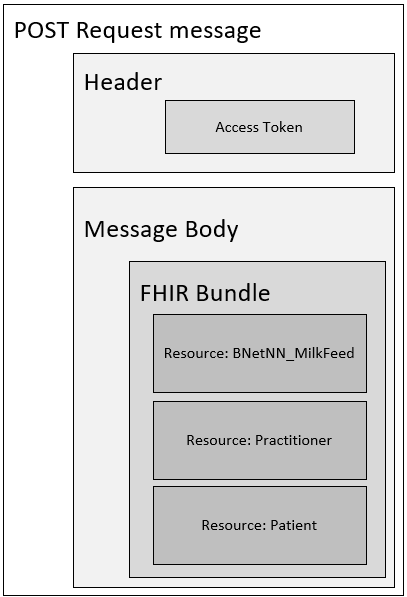
How to Send a Milk Feed
This section provides instructions on how to send a milk feed to the Spine. It centers around mandatory data items the Spine requires for data to be populated.
Pre-requisite: set up an account on BadgerNet
Before a Milk Feed can be sent to the Spine, the credentials used to obtain the access token by the client system must be set up in BadgerNet. These credentials are in the form of a user account on BadgerNet.
The BadgerNet username and password are the same as the Client ID and Secret used to obtain an access token.
A Spine Client User needs to be set up within a BadgerNet Care Location for it to receive feeds for a baby’s care record within the Care Location.
This can be done by a BadgerNet Care Location administrator. For the initial onboarding phase, these details will be provided.
Step 1: Obtain a Token
Please see the following page on how to obtain an access token Client Authentication

The Client ID being sent to the Identity Server is actually a BadgerNet username. This is set up in BadgerNet and can be composed of letters, numbers and hyphens.
One tracking device must have one BadgerNet username
Step 2: Send the request message
Once an access token string has been obtained, it can be added to the request message along with the milk feed in the form of FHIR.
Message Header
Key: Authorisation
The Spine expects the access token to be included in the Header of the message following the OAuth 2.0 Bearer Token standard.
The header must contain a Key with the name: Authorization.
The value of this key must begin with Bearer, followed by a space, followed by the token.
Message Body
The body of the request message must be the milk feed in a JSON-formatted FHIR message, which is detailed below. The body must be the same for creating and updating a milk feed.
Endpoints
There are two endpoints listed below: one to create a new milk feed and the other to update an existing milk feed. Each endpoint has a dollar($) sign indicating it is a FHIR Custom Operation.
In the endpoints listed below, [baseUrl] is the base URL which will be provided separately.
Create
POST [baseUrl]/MedicationAdministration/$create-milk-feed
Update
To update an existing milk feed, the [id] of the milk feed must be provided, which is obtained after a milk feed is created.
POST [baseUrl]/MedicationAdministration/[id]/$update-milk-feed
Although “PUT” would be the logical choice for a HTTP Method, the FHIR protocol doesn’t support PUT for Custom Operations - it must be POST.
Deleting a Milk Feed
A milk feed note can’t be deleted from BadgerNet via the Spine; it must be done in BadgerNet directly. It is recommended to “superficially” or “soft” delete the note instead by updating it and setting the following:
volume to be 0
Additives to DELETED
Feed method to DELETED
Since the Product can’t be a custom value, it can be left unchanged.
Step 3: Process Response
The Spine uses standard HTTP response status codes - for example, in the context of Milk Feeds:
201: Milk Feed successfully created
204: Update of Milk Feed successful
400: Bad request message; details will be provided in the message body in the form of an Operation Outcome
401: Unauthorized. It is likely the token used to access the endpoint has timed out. Request another token or contact Clevermed for support as it may be an issue with client configuration and/or credentials.
403: Forbidden. It is likely the credentials used to obtain the token do not have permissions to access Milk Feeds. This must be configured in BadgerNet.
404: Not Found. Cannot locate milk feed based on the provided ID
409: Conflict. Cannot create/update milk feed because a conflict occurred. It is likely there are multiple open baby records. This can be resolved in BadgerNet.
422: Failed to process milk feed due to a business error. Details will be provided in the message body in the form of an Operation Outcome.
500: An internal error occurred within the Spine.
Get a Milk Feed ID
When a milk feed is successfully created, a HTTP Status Code of 201 is sent back.
The ID of the milk feed which is required if the feed is to be updated can be found in the response message header.
The ID resides in the Header key named X-Logical-Id, which is a unique Guid.
Milk Feed Message Specification
Milk feed data must be in the form of FHIR (version 4) and in a JSON format, populated with the below listed mandatory data items.
Resource 1: BNetNN_MilkFeed
The Spine uses a customised FHIR Resource called BNetNN_MilkFeed, which is derived from the FHIR resource MedicationAdministration. This resource is used to capture details of the milk feed that is administered.
BNetNN_MilkFeed mandatory data
Data Item | Details |
|---|---|
Reference to Patient resource containing Baby ID | The Baby’s National ID (NHS or CHI number) is contained within a separate Patient resource. This Patient resource has an ID which is contained in the BNetNN_MilkFeed |
Feed Method | The manner by which feed was given. |
Volume | The amount of feed given in ml. |
Product | The milk feed product that was given. |
Time of feed | The time the feed was given in UTC. |
Staff member | The member of staff who administered the feed. |
Device ID | The ID of the client system. |
Status | This is a static value which should always be “completed". |
BNetNN_MilkFeed Optional Items
Data Item | Details |
|---|---|
Additive | The additive or fortifier within the product. Either a BadgerNet specific Code or a custom value can be provided. |
A more detailed specification of the BNetNN_MilkFeed can be found on Simplifier.net at https://simplifier.net/badgernet/bnetnn_milkfeed. This spec includes for example, restrictions and cardinality.
The spec on Simiplifer.net offers a comparison view between the MedicationAdministration resource and what has been changed to make it a BNetNN_MilkFeed. For example, it is mandatory in the NBetNN_MilkFeed to provide the dosage information (whereas the MedicationAdministration resource states it is optional). To view the difference, simply go to the BNetNN_MilkFeed spec on Simplifier and select diff, as highlighted below:
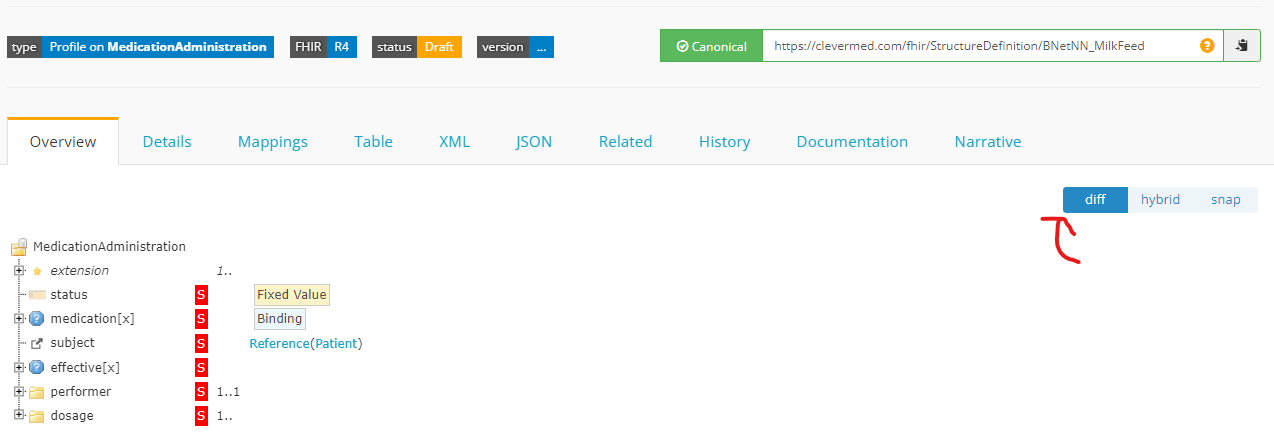
The BNetNN_MilkFeed resource specification on Simplifier.net

Elements marked with S in red mean they are mandatory.
Resource 2: Practitioner (staff member)
The second resource required in the Bundle is a Practitioner resource. It is very lightweight and just needs to contain the ID of the staff member administering the milk feed. The BNetNN_MilkFeed resource then references the Practitioner resource.
Practitioner mandatory data
Data Item | Details |
|---|---|
Resource ID | This must be a unique Guid to identify this resource. It is used in the MedicationAdministration resource to reference the Practitioner resource. |
Practitioner ID | The ID of the staff member administering the feed. |
Practitioner optional data
Data Item | Details |
|---|---|
Name | Details of the Staff Member’s name will be populated in the milk feed if it is provided |
Resource 3: Patient (baby)
The third resource required in the Bundle is a Patient resource. Like the Practitioner resource, it is lightweight and requires the Baby’s National ID. The BNetNN_MilkFeed resource references the Patient resource in the same way it does the Practitioner.
The baby’s Date of Birth can be added an optional field. If provided, the Date of Birth is used to locate the Baby Record in BadgerNet. If it isn’t provided, the Spine will attempt to locate the Baby Record solely on the provided National ID.
Patient mandatory data
Data Item | Details |
|---|---|
Resource ID | This must be a unique Guid to identify this resource. It is used in the MedicationAdministration resource to reference the Patient resource. |
Baby ID | The National ID of the baby receiving the feed. This is used to find the baby’s record |
Patient optional data
Data Item | Details |
|---|---|
Date of Birth | The Baby’s birth date is used to help locate the baby’s record. If this is provided it must be correct |
Name | Details of the Baby’s name. This is not used in the milk feed |
BadgerNet Codes (Value Sets)
Each data item in BadgerNet has a unique code (aka BadgerNet Code). These codes have been made public and are stored on our Simplifier Profile, where they will be kept up to date.
One benefit of these codes being stored on Simplifier is that they are also exposed as an API, which means they can be automatically retrieved and processed by a system.
Each set of codes, also known as a Value Set, are listed below with their corresponding location.
Each Product, Additive and method code are independent of each other.
Milk Product Codes
Source: https://simplifier.net/badgernet/ValueSet-BNet-Child-NNMilkFeedProduct
GET Url: https://fhir.simplifier.net/BadgerNet/ValueSet/BNetNNMilkFeedProductValueSet
Milk Additives
Source: https://simplifier.net/badgernet/ValueSet-BNet-Child-NNMilkFeedAdditive
GET Url: https://fhir.simplifier.net/BadgerNet/ValueSet/BNetNNMilkFeedAdditiveValueSet
Feeding Methods
Source: https://simplifier.net/badgernet/ValueSet-BNet-Child-NNMilkFeedingMethod
GET Url: https://fhir.simplifier.net/BadgerNet/ValueSet/BNetNNMilkFeedMethodValueSet
Using custom data items instead of a BadgerNet/SNOMED Code
A custom string can be used if an appropriate BadgerNet or SNOMED code can’t be used.
A FHIR CodeableConcept allows for this:
A free text only representation of the concept without any coding elements is permitted if there is no appropriate code and only free text is available (and not prohibited by the implementation).
It is strongly advised to use BadgerNet codes instead of custom values where possible.
Please get in touch if custom values become frequent as they could be added to BadgerNet.
Spine FHIR Resource Structure
FHIR Structure: BNetNN_MilkFeed
The FHIR Resource the Spine requires for milk feeds is based on the FHIR resource MedicationAdministration. The only difference between the two is that the BNetNN_MilkFeed resource has an extension to it, which means it has an added element - specifically, to add the Additive string value.
Client systems can populate as many fields as it would like in the resource, however the Spine will only process the minimum amount of mandatory values.
The table below lists the mandatory elements within the BNetNN_MilkFeed resource at a high level.
Details, such as cardinality and other restrictions can be found in the Simplifier profile for BNetNN_MilkFeed.
Examples of messages for clarification are on this page below.
FHIR Element | Required details | Mandatory/ Optional | Comment |
|---|---|---|---|
Meta | Element Type: Meta Profile: http://hl7.org.nz/fhir/StructureDefinition/BNetNN_MilkFeed | Mandatory | This tells the Spine that this resource is a BNetNN_MilkFeed |
Subject | Element Type: Reference (Patient) The relative path to the Practitioner resource | Mandatory | This element is a Reference to a Patient resource within the Bundle containing details of the baby. |
Status | Element Type: Code Completed | Mandatory | This is a fixed value (“completed”) indicating the milk feed is complete |
Medication | Element Type: CodeableConcept System: https://clevermed.com/fhir/ValueSet/BNetNN_MilkFeedProductValueSet Code: BadgerNet Product code | Mandatory | This is the feed that was given. A BadgerNet defined value set is the value of this field. A custom value may not be used. |
Effective | Element Type: dateTime Value: DateTime of feed | Mandatory | The DateTime of the feed in UTC |
Performer | Element Type: Reference (Practitioner) Actor: The relative path to the Practitioner resource | Mandatory | Who performed the intake (staff member) is a reference to a Practitioner resource within the same Bundle as the BNetNN_MilkFeed |
Dosage |
| Mandatory | Feeding method is a SNOMED code. The Dose is a decimal value and in ml
|
Additive | Element Type: Extension(CodeableConcept) URL: https://clevermed.com/fhir/Extension/MilkFeedAdditive system: | Optional | This is a FHIR extension to the MedicationAdministration resource. |
FHIR Structure: Practitioner
This Practitioner resource is very lightweight, as highlighted in the table below:
FHIR Element | Required details | Mandatory/ Optional | Comment |
|---|---|---|---|
id | Element Type: id | Mandatory | A Guid value to uniquely identify this resource. |
Identifier | Element Type: Identifier
| Mandatory | The System indicates the value is a staff member ID. Use the value field to populate the user’s ID. |
Name | Element Type: HumanName
| Optional | This is used in the milk feed as meta data if provided |
FHIR Structure: Patient
The Patient resource within the Bundle contains details of the baby. It is also very lightweight, as highlighted below:
FHIR Element | Required details | Mandatory/ Optional | Comment |
|---|---|---|---|
id | Element Type: id | Mandatory | A Guid value to uniquely identify this resource. |
Identifier | Element Type: Identifier
| Mandatory | The System indicates the value is an NHS number in England and Wales. If Northern Ireland is required, please get in touch with Clevermed. |
Date of Birth | Element Type: Date Value: Baby’s Date of Birth | Optional | Optional |
Name | Element Type: HumanName
| Optional | This is currently not used |
How a Baby Care Record is identified by the Spine
A baby may have multiple care records in BadgerNet, which means they share the same National ID.
The Spine uses the open care record of a baby to store milk feeds. If more than one open record exists for the same National ID, a 409 (Conflict) HTTP Status Code is returned from the Spine. This conflict can only be resolved in BadgerNet.
Example messages
Below are test message examples to create and update a milk feed. Each example contains the minimum amount of data required to generate a milk feed dataset in BadgerNet and may have optional data.
The example create a milk feed on a baby record with the national ID of “T:8IZ1488UH1E”.
Examples have been created using the FHIR SDK by Firely.
Example 1: Using BadgerNet Codes
This request message creates the following milk feed data item in BadgerNet using only Value Sets (i.e. BadgerNet and SNOMED codes).
Request method: POST
Baby ID: T:8IZ1488UH1E
Feed Method: Bottle
Volume: 50 ml
Product: Mother's fresh expressed breast milk
Additive: None
Time of Feed: A UTC DateTime stamp
Staff Member ID: NurseID123
Device ID: This will have been provided in the token
{
    "resourceType": "Bundle",
    "type": "collection",
    "entry": [
        {
            "resource": {
                "resourceType": "Patient",
                "id": "bdad9033-90e1-4115-a875-4eb4574df9a1",
                "identifier": [
                    {
                        "use": "official",
                        "system": "https://fhir.nhs.uk/Id/nhs-number",
                        "value": "T:8IZ1488UH1E"
                    }
                ],
                "name": [
                    {
                        "use": "official",
                        "family": "Monsoon",
                        "given": [
                            "Jinkx"
                        ]
                    }
                ],
                "birthDate": "2022-09-29"
            }
        },
        {
            "resource": {
                "resourceType": "Practitioner",
                "id": "df581cac-7312-433d-9141-f20a84f8e2c8",
                "identifier": [
                    {
                        "system": "https://clevermed.com/fhir/ValueSet/UKPractitioner",
                        "value": "NurseID123"
                    }
                ],
                "name": [
                    {
                        "family": "Grey",
                        "given": [
                            "Meredith"
                        ],
                        "prefix": [
                            "Dr"
                        ]
                    }
                ]
            }
        },
        {
            "resource": {
                "resourceType": "MedicationAdministration",
                "meta": {
                    "profile": [
                        "https://clevermed.com/fhir/StructureDefinition/BNetNN_MilkFeed"
                    ]
                },
                "extension": [
                    {
                        "url": "https://clevermed.com/fhir/StructureDefinition/BNetNNMilkFeedAdditives"
                    }
                ],
                "status": "completed",
                "medicationCodeableConcept": {
                    "coding": [
                        {
                            "system": "https://clevermed.com/fhir/ValueSet/BNetNN_MilkFeedProductValueSet",
                            "code": "501004"
                        }
                    ]
                },
                "subject": {
                    "reference": "Patient/bdad9033-90e1-4115-a875-4eb4574df9a1"
                },
                "effectiveDateTime": "2022-10-07T14:30:58.4583881+00:00",
                "performer": [
                    {
                        "actor": {
                            "reference": "Practitioner/df581cac-7312-433d-9141-f20a84f8e2c8"
                        }
                    }
                ],
                "dosage": {
                    "method": {
                        "coding": [
                            {
                                "system": "http://snomed.info/sct",
                                "code": "470649004"
                            }
                        ]
                    },
                    "dose": {
                        "value": 50,
                        "unit": "ml",
                        "system": "http://unitsofmeasure.org",
                        "code": "ml"
                    }
                }
            }
        }
    ]
}
Response
A successful 201 http response code with the ID (Guid) of the milk feed in the header's X-Logical-Id key. This is the ID needed if the milk feed should be later updated.
Outcome
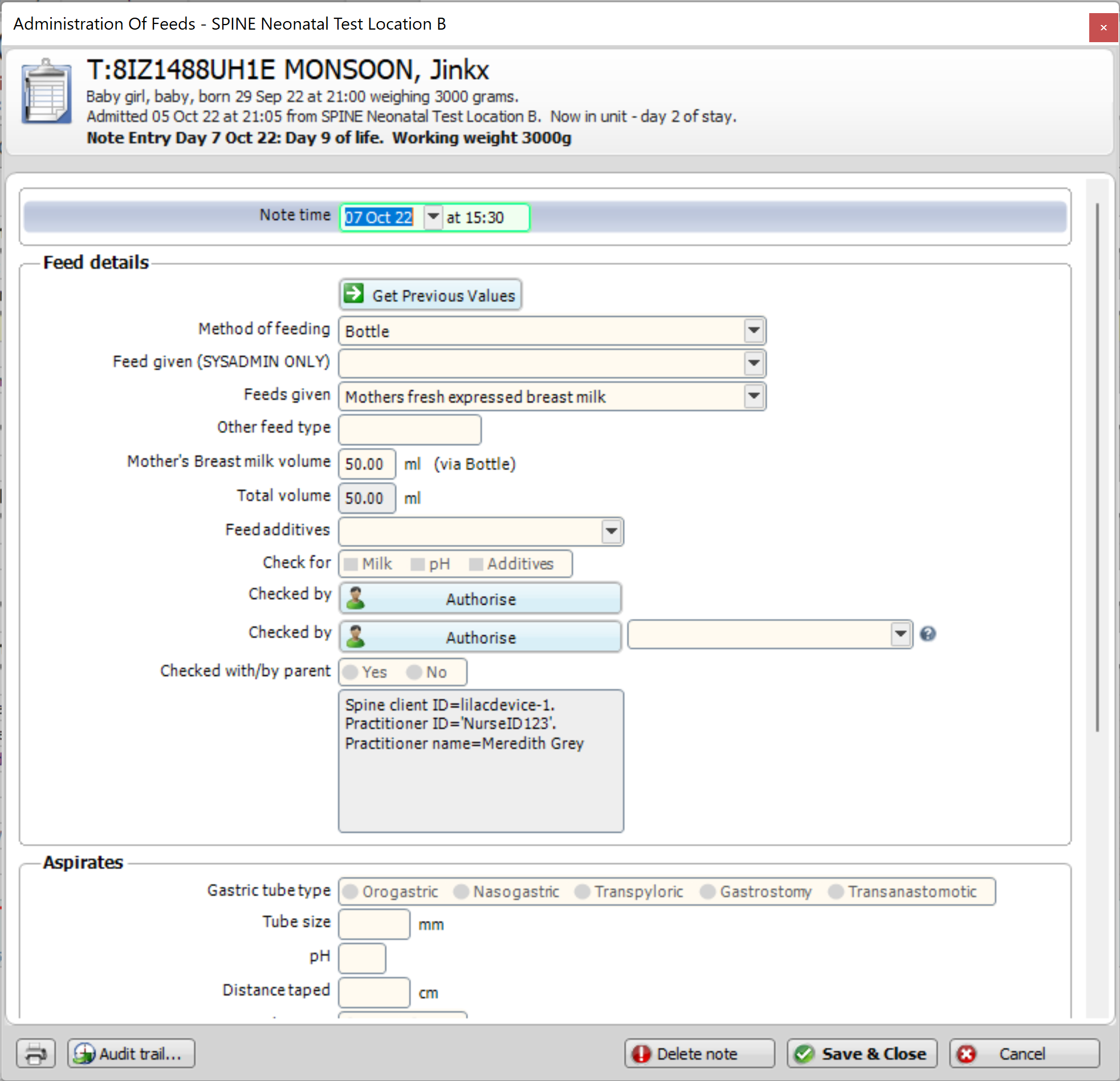
Example 2: Custom milk feed data
This request message is an example of a milk feed which uses custom values where possible.
Request method: POST
Baby ID: T:8IZ1488UH1E
Feed Method: Syringe
Volume: 50ml
Product: Mother's fresh expressed breast milk
Additive: Vitamin D
Time of Feed: A UTC DateTime stamp
Staff Member ID: NurseID123
Device ID: This will have been provided in the token
{
    "resourceType": "Bundle",
    "type": "collection",
    "entry": [
        {
            "resource": {
                "resourceType": "Patient",
                "id": "a933d728-1604-4a36-90bb-83bb44e3436d",
                "identifier": [
                    {
                        "use": "official",
                        "system": "https://fhir.nhs.uk/Id/nhs-number",
                        "value": "T:8IZ1488UH1E"
                    }
                ],
                "name": [
                    {
                        "use": "official",
                        "family": "Monsoon",
                        "given": [
                            "Jinkx"
                        ]
                    }
                ],
                "birthDate": "2022-09-29"
            }
        },
        {
            "resource": {
                "resourceType": "Practitioner",
                "id": "5267532f-4fff-46e9-8a58-1eded156e966",
                "identifier": [
                    {
                        "system": "https://clevermed.com/fhir/ValueSet/UKPractitioner",
                        "value": "NurseID123"
                    }
                ],
                "name": [
                    {
                        "family": "Grey",
                        "given": [
                            "Meredith"
                        ],
                        "prefix": [
                            "Dr"
                        ]
                    }
                ]
            }
        },
        {
            "resource": {
                "resourceType": "MedicationAdministration",
                "meta": {
                    "profile": [
                        "https://clevermed.com/fhir/StructureDefinition/BNetNN_MilkFeed"
                    ]
                },
                "extension": [
                    {
                        "extension": [
                            {
                                "url": "https://clevermed.com/fhir/StructureDefinition/BNetNNMilkFeedAdditive",
                                "valueCodeableConcept": {
                                    "text": "Vitamin D"
                                }
                            }
                        ],
                        "url": "https://clevermed.com/fhir/StructureDefinition/BNetNNMilkFeedAdditives"
                    }
                ],
                "status": "completed",
                "medicationCodeableConcept": {
                    "coding": [
                        {
                            "system": "https://clevermed.com/fhir/ValueSet/BNetNN_MilkFeedProductValueSet",
                            "code": "501004"
                        }
                    ]
                },
                "subject": {
                    "reference": "Patient/a933d728-1604-4a36-90bb-83bb44e3436d"
                },
                "effectiveDateTime": "2022-10-07T13:09:58.4684759+00:00",
                "performer": [
                    {
                        "actor": {
                            "reference": "Practitioner/5267532f-4fff-46e9-8a58-1eded156e966"
                        }
                    }
                ],
                "dosage": {
                    "method": {
                        "text": "Syringe"
                    },
                    "dose": {
                        "value": 50,
                        "unit": "ml",
                        "system": "http://unitsofmeasure.org",
                        "code": "ml"
                    }
                }
            }
        }
    ]
}
Response
A successful 201 http response code with the ID (Guid) of the milk feed in the headers' X-Logical-Id key. This is the ID needed if the milk feed should be later updated.
Outcome
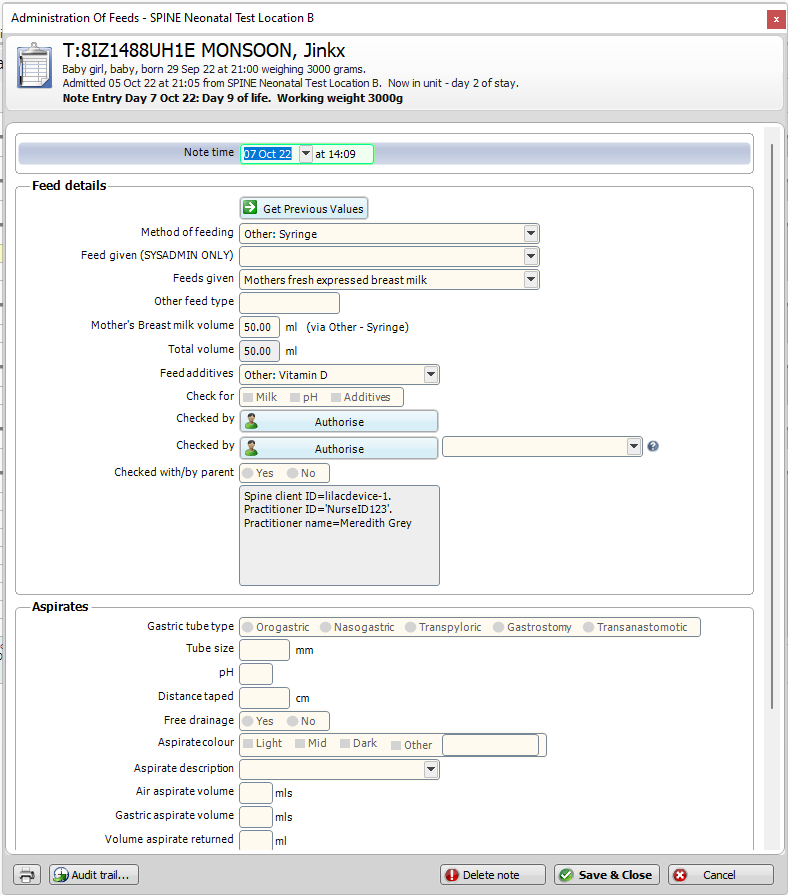
Example 3: Milk feed with multiple additives
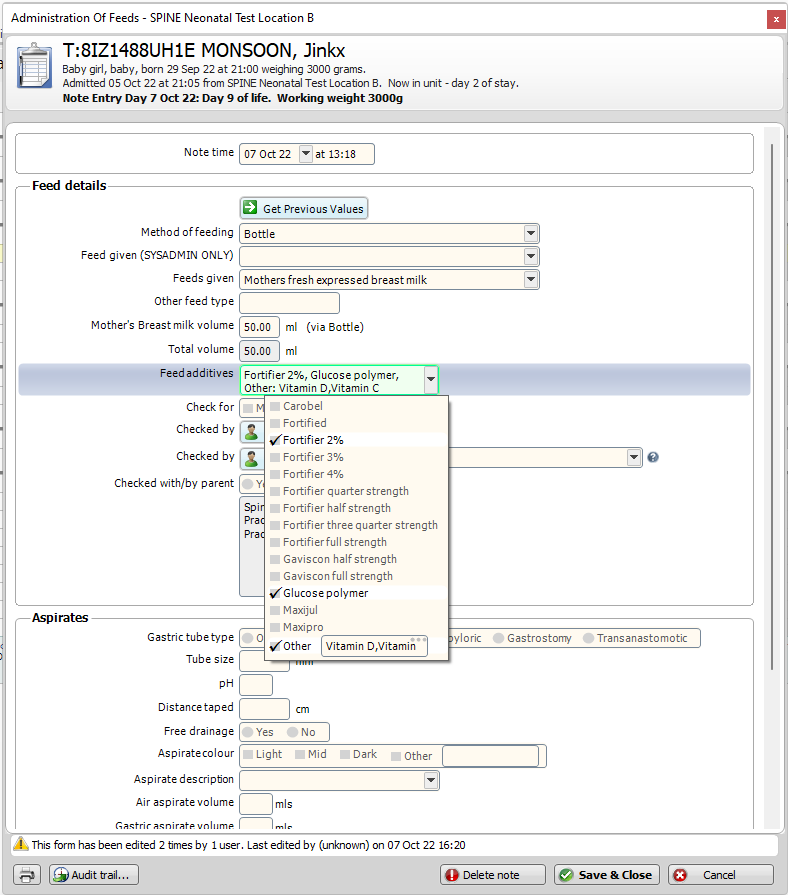
This request message is an example of a milk feed containing multiple additives, two of which are custom values: “Vitamin D” and “Vitamin C”.
Request method: POST
Baby ID: T:8IZ1488UH1E
Feed Method: Bottle
Volume: 50ml
Product: Mothers fresh expressed breast milk
Additives: Fortifier 2%, Vitamin D, Glucose polymer, Vitamin C
Time of Feed: A UTC DateTime stamp
Staff Member ID: NurseID456
Device ID: This will have been provided in the token
Note how the parent Extension has a different URL to its child Extensions (details).
{
    "resourceType": "Bundle",
    "type": "collection",
    "entry": [
        {
            "resource": {
                "resourceType": "Patient",
                "id": "e24609b4-930a-463c-b603-352ed7c05b33",
                "identifier": [
                    {
                        "use": "official",
                        "system": "https://fhir.nhs.uk/Id/nhs-number",
                        "value": "T:8IZ1488UH1E"
                    }
                ],
                "name": [
                    {
                        "use": "official",
                        "family": "Monsoon",
                        "given": [
                            "Jinkx"
                        ]
                    }
                ],
                "birthDate": "2022-09-29"
            }
        },
        {
            "resource": {
                "resourceType": "Practitioner",
                "id": "99236a46-7ef1-488f-ade6-c9db7581bf1a",
                "identifier": [
                    {
                        "system": "https://clevermed.com/fhir/ValueSet/UKPractitioner",
                        "value": "NurseID123"
                    }
                ],
                "name": [
                    {
                        "family": "Grey",
                        "given": [
                            "Meredith"
                        ],
                        "prefix": [
                            "Dr"
                        ]
                    }
                ]
            }
        },
        {
            "resource": {
                "resourceType": "MedicationAdministration",
                "meta": {
                    "profile": [
                        "https://clevermed.com/fhir/StructureDefinition/BNetNN_MilkFeed"
                    ]
                },
                "extension": [
                    {
                        "extension": [
                            {
                                "url": "https://clevermed.com/fhir/StructureDefinition/BNetNNMilkFeedAdditive",
                                "valueCodeableConcept": {
                                    "coding": [
                                        {
                                            "system": "https://clevermed.com/fhir/ValueSet/BNetNN_MilkFeedAdditiveValueSet",
                                            "code": "F2"
                                        }
                                    ]
                                }
                            },
                            {
                                "url": "https://clevermed.com/fhir/StructureDefinition/BNetNNMilkFeedAdditive",
                                "valueCodeableConcept": {
                                    "text": "Vitamin D"
                                }
                            },
                            {
                                "url": "https://clevermed.com/fhir/StructureDefinition/BNetNNMilkFeedAdditive",
                                "valueCodeableConcept": {
                                    "coding": [
                                        {
                                            "system": "https://clevermed.com/fhir/ValueSet/BNetNN_MilkFeedAdditiveValueSet",
                                            "code": "G2"
                                        }
                                    ]
                                }
                            },
                            {
                                "url": "https://clevermed.com/fhir/StructureDefinition/BNetNNMilkFeedAdditive",
                                "valueCodeableConcept": {
                                    "text": "Vitamin C"
                                }
                            }
                        ],
                        "url": "https://clevermed.com/fhir/StructureDefinition/BNetNNMilkFeedAdditives"
                    }
                ],
                "status": "completed",
                "medicationCodeableConcept": {
                    "coding": [
                        {
                            "system": "https://clevermed.com/fhir/ValueSet/BNetNN_MilkFeedProductValueSet",
                            "code": "501004"
                        }
                    ]
                },
                "subject": {
                    "reference": "Patient/e24609b4-930a-463c-b603-352ed7c05b33"
                },
                "effectiveDateTime": "2022-10-07T12:18:22.1510368+00:00",
                "performer": [
                    {
                        "actor": {
                            "reference": "Practitioner/99236a46-7ef1-488f-ade6-c9db7581bf1a"
                        }
                    }
                ],
                "dosage": {
                    "method": {
                        "coding": [
                            {
                                "system": "http://snomed.info/sct",
                                "code": "470649004"
                            }
                        ]
                    },
                    "dose": {
                        "value": 50,
                        "unit": "ml",
                        "system": "http://unitsofmeasure.org",
                        "code": "ml"
                    }
                }
            }
        }
    ]
}
Response
A successful 201 http response code with the ID (Guid) of the milk feed in the header's X-Logical-Id key. This is the ID needed if the milk feed should be later updated.
Outcome
Example 4: Update a milk feed
The message body to update a milk feed is the exactly the same as creating a milk feed. The only difference is:
The endpoint
The request method is POST
Response
A successful 204 http response code
Example 5: Cancelling a milk feed
The only way to effectively delete a milk feed is to set the volume of the product to 0. All other parameters may remain the same, however for added measure it is recommended they be “DELETE” as a custom value for improved visibility for a BadgerNet user.
A Patient and Practitioner resource must still be referenced to the BNetNN_MilkFeed resource
Request method: POST
{
    "resourceType": "Bundle",
    "type": "collection",
    "entry": [
        {
            "resource": {
                "resourceType": "Patient",
                "id": "e61e0c07-81a5-470f-beea-3cf3319a4113",
                "identifier": [
                    {
                        "use": "official",
                        "system": "https://fhir.nhs.uk/Id/nhs-number",
                        "value": "T:8IZ1488UH1E"
                    }
                ],
                "name": [
                    {
                        "use": "official",
                        "family": "Monsoon",
                        "given": [
                            "Jinkx"
                        ]
                    }
                ],
                "birthDate": "2022-09-29"
            }
        },
        {
            "resource": {
                "resourceType": "Practitioner",
                "id": "6b5557a1-4203-4f83-901b-7f9bff496b68",
                "identifier": [
                    {
                        "system": "https://clevermed.com/fhir/ValueSet/UKPractitioner",
                        "value": "NurseID123"
                    }
                ],
                "name": [
                    {
                        "family": "Grey",
                        "given": [
                            "Meredith"
                        ],
                        "prefix": [
                            "Dr"
                        ]
                    }
                ]
            }
        },
        {
            "resource": {
                "resourceType": "MedicationAdministration",
                "meta": {
                    "profile": [
                        "https://clevermed.com/fhir/StructureDefinition/BNetNN_MilkFeed"
                    ]
                },
                "extension": [
                    {
                        "extension": [
                            {
                                "url": "https://clevermed.com/fhir/StructureDefinition/BNetNNMilkFeedAdditive",
                                "valueCodeableConcept": {
                                    "text": "DELETED"
                                }
                            }
                        ],
                        "url": "https://clevermed.com/fhir/StructureDefinition/BNetNNMilkFeedAdditives"
                    }
                ],
                "status": "completed",
                "medicationCodeableConcept": {
                    "coding": [
                        {
                            "system": "https://clevermed.com/fhir/ValueSet/BNetNN_MilkFeedProductValueSet",
                            "code": "501004"
                        }
                    ]
                },
                "subject": {
                    "reference": "Patient/e61e0c07-81a5-470f-beea-3cf3319a4113"
                },
                "effectiveDateTime": "2022-10-07T12:23:05.4536276+00:00",
                "performer": [
                    {
                        "actor": {
                            "reference": "Practitioner/6b5557a1-4203-4f83-901b-7f9bff496b68"
                        }
                    }
                ],
                "dosage": {
                    "method": {
                        "text": "DELETED"
                    },
                    "dose": {
                        "value": 50,
                        "unit": "ml",
                        "system": "http://unitsofmeasure.org",
                        "code": "ml"
                    }
                }
            }
        }
    ]
}
Outcome
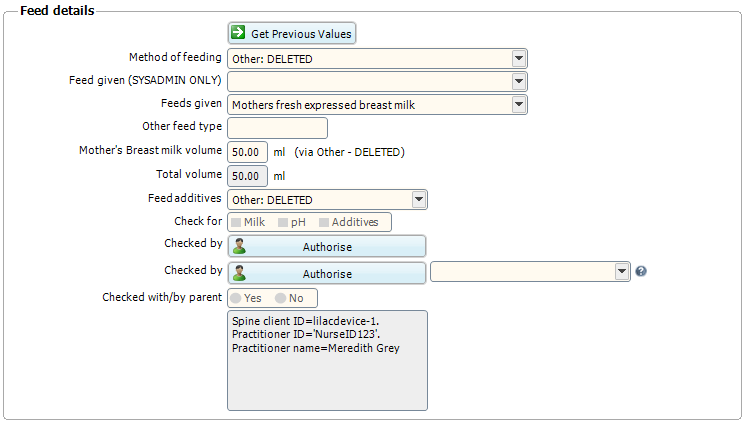
A successful 204 http response code