
Record Change Notifications
Overview
The underlying raw BadgerNet care record can and will be updated many times from multiple locations and sources. As a single, nationally hosted care record, users from multiple Care Locations and other systems such as PAS, LABS and medical devices all have the capacity to update this single care record at any time.
Each time a care record is updated, its FHIR-equivalent record is updated, usually within a few seconds.
Using Record Change Notifications, the BadgerNet Spine can “inform” Spine Client Systems whenever the underlying FHIR record is updated in any way using ‘push notification’ architecture, as described below.
The FHIR R5 specification describes a standard for a Topic-Based Subscriptions Framework which can be used to establish proactive event notifications from a FHIR server to another system. The standard defines three primary Actors and Roles which participate in notifications:
Server | The BadgerNet Spine is responsible for implementing Subscription Topics, managing Subscriptions and sending notifications. |
|---|---|
Client or Subscriber | The Spine Client System requesting topic-based notifications. The Client is responsible for creating Subscriptions and receiving notifications on a supported channel. |
Endpoint | An Endpoint is a system which is responsible for receiving notification messages. It may be a part of the Client, however it is useful to refer to it separately for clarity. In this implementation, the Endpoint is an HTTP endpoint which can receive POST requests from the Server. |
Workflow overview
The notifications feature of the BadgerNet Spine utilises a Topic Subscription model (also known as Pub/Sub) where the server publishes events of a particular type, and clients can optionally subscribe to receive notification of those events when they take place. Spine Client Systems are free to manage their own endpoint definitions and subscriptions and do so via a management API. Each time an event takes place which triggers a notification on a Topic, a message is sent to the endpoint registered by each client as part of their subscription.
There are three distinct stages which define the notification interactions between the BadgerNet Spine Server and Spine Client Systems:
Stage 1: Topic Definition
Client System may choose to query the list of topics to which they can subscribe. See Reading Topics for more information on querying Topics.
Stage 2: Client Subscription
Client System creates the necessary infrastructure to receive notification messages.
Client System calls the Spine API to register at least one Endpoint. See Working with Endpoints
Client System calls the Spine API to subscribe to topics. See Subscribing to Topics
Stage 3: Notification sending
Client System receives and processes notification messages sent to its Endpoint as required. See Notification Payloads for details of the messages sent to Endpoints.
Client System responds to the notification message to indicate success.
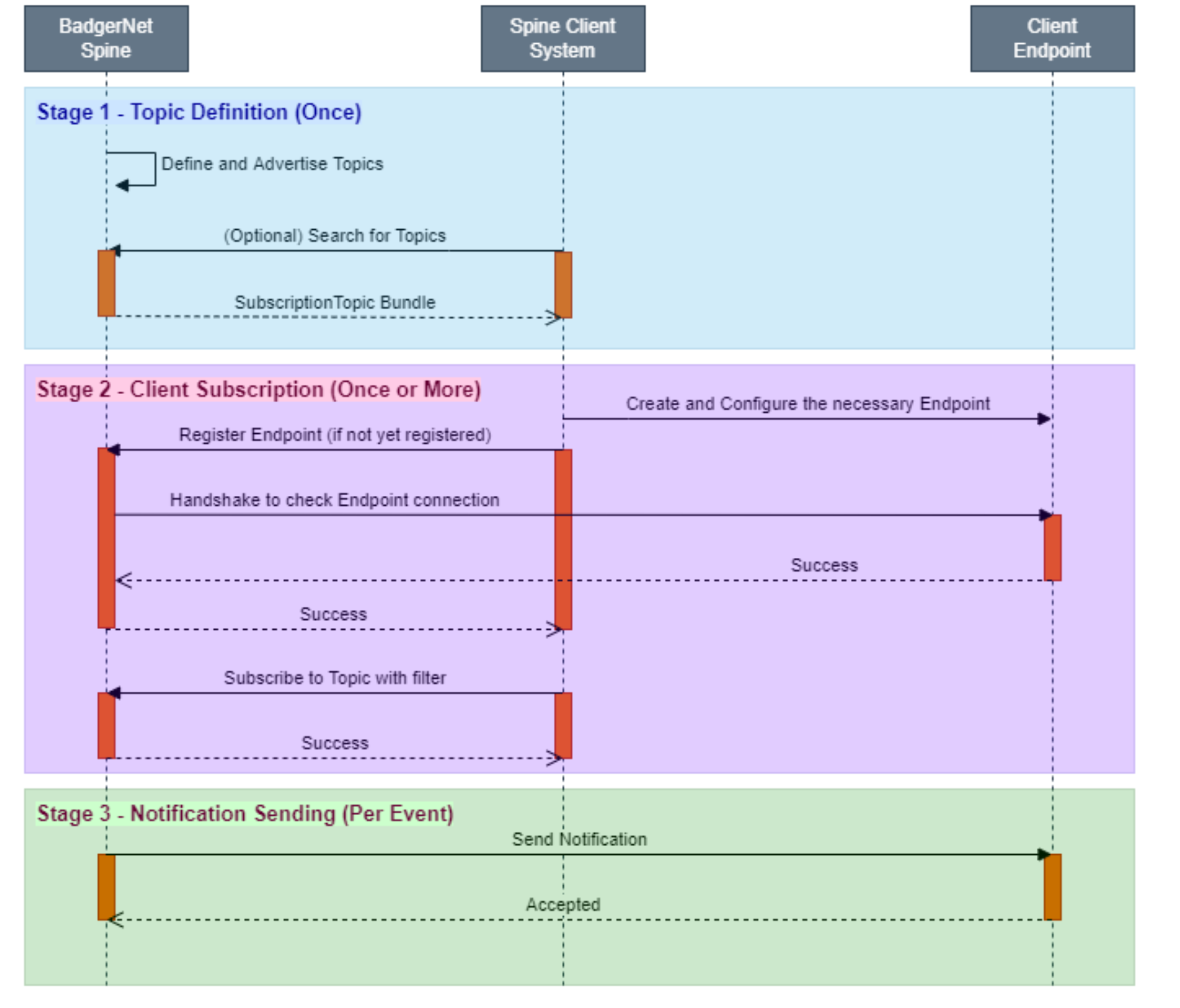
Notification Flow Overview
Alternative to Push Notifications
Some Spine Client Systems may be unable to expose an HTTP Endpoint which can receive push notifications from the BadgerNet Spine, so an alternative mechanism is provided to allow the discovery of recent Subscription events. This system uses a ‘Pull’ system to allow Spine Client Systems to proactively query an endpoint on the Spine API for Subscription events, and in this way obtain a list of all events which have been raised on the Subscription since they last checked.
$events Endpoint
The FHIR Notification Framework defines an operation endpoint for the purpose of querying Subscription events at the following path:
[base]/Subscription/[Subscription ID]/$eventsSpine Client Systems can query this endpoint to obtain a list of recent events which occurred on the subscription. The client can only query for events on a Subscription owned by that client, and events are automatically deleted from the list after a period of 90 days.
Since each event triggered within the Spine is assigned a unique incrementing number, this value can be included in queries to the $events endpoint to filter the list of events to return. A Spine Client System can store the highest event number it has previously received, and then use it in future queries to only return new events since the last synchronisation. A pair of parameters may be used to page results when querying the $events endpoint:
eventsSinceNumber: the starting event number, inclusive of this event (lower bound)
eventsUntilNumber: the ending event number, inclusive of this event (upper bound)
The $events endpoint returns data within a subscription-notification bundle in the same format as that returned for rest-hook notifications and includes an entry in the Notification Event array for each event found in the query.
Another usage scenario of the $events endpoint is that it can also be used by clients using Rest Hook Subscriptions to allow them to recover from error conditions, for example if missing notifications are discovered due to transport failures. In this methodology, client Endpoints may wish to keep track of incoming event numbers and respond to any gaps in event numbering by proactively querying for those events.
Resilience
Notification Retry
Rest Hook messages are sent over a network to systems external to the BadgerNet Spine, and it’s possible that this communication may fail either for transient reasons such as a temporary hardware outage, or for longer-term reasons such as routing misconfiguration. The BadgerNet Spine will retry message sending up to five times with increasing backoff delay between attempts. Additionally, ‘jitter’ will be randomly added to the delay time to reduce the risk that peaks of simultaneous retry attempts will overwhelm the client endpoint.
Heartbeat Notifications
To allow client endpoints to recognise a fault in the communication channel between Server and Endpoint, the Server can be configured to periodically send a heartbeat notification to each Rest Hook Subscription. To enable this functionality, a value must be configured on the Subscription heartbeatPeriod property and must be within the range 60 seconds to 86,400 seconds (24 hours).
Each heartbeat notification takes the form of a standard notification bundle, with a type of heartbeat. Clients may compare the eventsSinceSubscriptionStart property of the heartbeat notification with their own records to determine if the number of received events matches.
If a client system finds a discrepancy in the number of events received at the endpoint, it can then make a query to the $events endpoint to proactively load any missing events.
Security
Rest Hook endpoints configured within the BadgerNet Spine notification system must use an HTTPS scheme to ensure that traffic is encrypted when the Server sends notifications.
It is recommended that Spine Client Systems use the header property when configuring endpoints to instruct the Server to send an authentication token with notification messages. This feature is designed to offer flexibility to how client endpoints verify the sender of notifications, however the method by which clients implement this feature is out of scope of this document.
No Patient medical information is included within notification bundles, only the IDs of Patient records affected by the event. It is the responsibility of the Spine Client System to then use those IDs to make an authenticated request to read the data for that Patient, which is subject to the existing access control measures within the BadgerNet Spine.